All signs

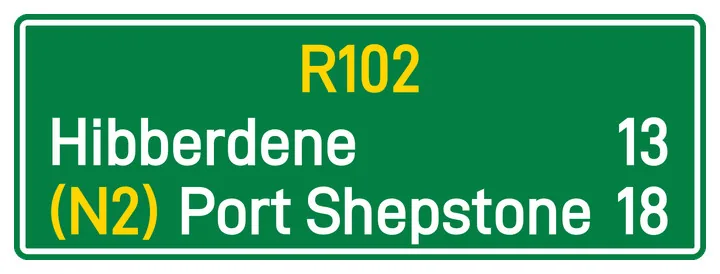
Confirmation (GD3, TGD3)

  • Guidance
  • Direction Signs
Confirmation (GD3, TGD3)

What it means

Confirms the route you are currently traveling on and often indicates the distance to upcoming towns.

What to do

  1. Use it to check you took the right turn: the route and towns should match your trip.
  2. Read the distances to the places ahead to see how far you still have to go.

In the K53 test

A confirmation sign appears after a junction and confirms the route you are on. It informs you; it does not tell you to turn.

Where you will see it

After a junction, confirming the route and the distances to the places ahead.
Get Driver53 on your phone.

500+ signs, timed Tests, and progress for every licence code. Launching soon on iPhone and Android.

  • App StoreComing soon for iPhone
  • Google PlayComing soon for Android

One email when Driver53 reaches iOS and Android. No newsletter.

On a computer? Scan this with your phone camera to open the download page there.

Get Driver53 on your phone.

Ten Tests for every code, with the same section pass marks as the real paper. Launching soon on iPhone and Android.

  • App StoreComing soon for iPhone
  • Google PlayComing soon for Android

One email when Driver53 reaches iOS and Android. No newsletter.

On a computer? Scan this with your phone camera to open the download page there.